
AI teaching tools for students are software and platforms that use artificial intelligence to personalise learning, provide instant feedback, and help students understand difficult concepts faster. These tools adapt to each learner’s pace and style, making education more engaging and effective. This article covers the best AI tools available, how they work in the classroom and at home, and how educators can use them to support their students.
What are AI teaching tools for students?
AI teaching tools are digital applications that use machine learning and artificial intelligence to support learning. They analyse how a student learns, identify gaps in understanding, and suggest personalised lessons or practice problems. Unlike traditional software, AI tools get smarter the more a student uses them, adjusting difficulty and content in real time.
These tools work across subjects, from maths and science to languages and coding. They can mark assignments instantly, explain concepts in multiple ways, and even flag when a student is struggling so a teacher can step in. For educators running home-based learning centres or PODs, AI tools reduce the time spent on routine tasks and free up time to focus on one-on-one support.
How do AI teaching tools help students learn?
AI teaching tools support learning in several key ways. First, they personalise the learning path: if a student struggles with fractions, the tool gives more practice on that topic before moving forward, rather than forcing all students through the same sequence. Second, they provide instant feedback, a student knows right away if an answer is wrong and why, rather than waiting days for a teacher to mark work. Third, they keep students engaged by adjusting difficulty: too easy and they get bored; too hard and they give up. AI finds the middle ground.
Fourth, these tools collect data on learning patterns. A teacher can see which concepts the whole class found hard, who needs extra help, and who is ready to move ahead. This helps educators tailor their teaching. Fifth, many AI tools make learning interactive through games, simulations, or real-world scenarios, which improves retention. Quality education for every child in India requires tools that reach students in rural areas and those who cannot attend formal school; AI tools bring that opportunity to home-based learning centres and PODs.
Which AI tools work best for different subjects?
Several AI-powered platforms are now widely used in Indian schools and learning centres:
- Coding and STEM: Scratch (visual programming for beginners), Code.org (structured coding lessons), and Eklavya AI (adaptive problem-solving in maths and logic) help students build computational thinking.
- Maths: Platforms like BYJU’S and Khan Academy use AI to track progress and suggest targeted lessons based on mistakes.
- Languages: Duolingo and similar apps use spaced repetition and AI to personalise vocabulary and grammar practice.
- Science: Virtual labs and simulations let students experiment safely and learn through trial and error, with AI guiding them toward correct conclusions.
- General learning support: ChatGPT and similar large language models can explain concepts, answer questions, and help with homework, though they work best when a teacher guides their use.

How do you set up AI tools in a home-based learning centre or POD?
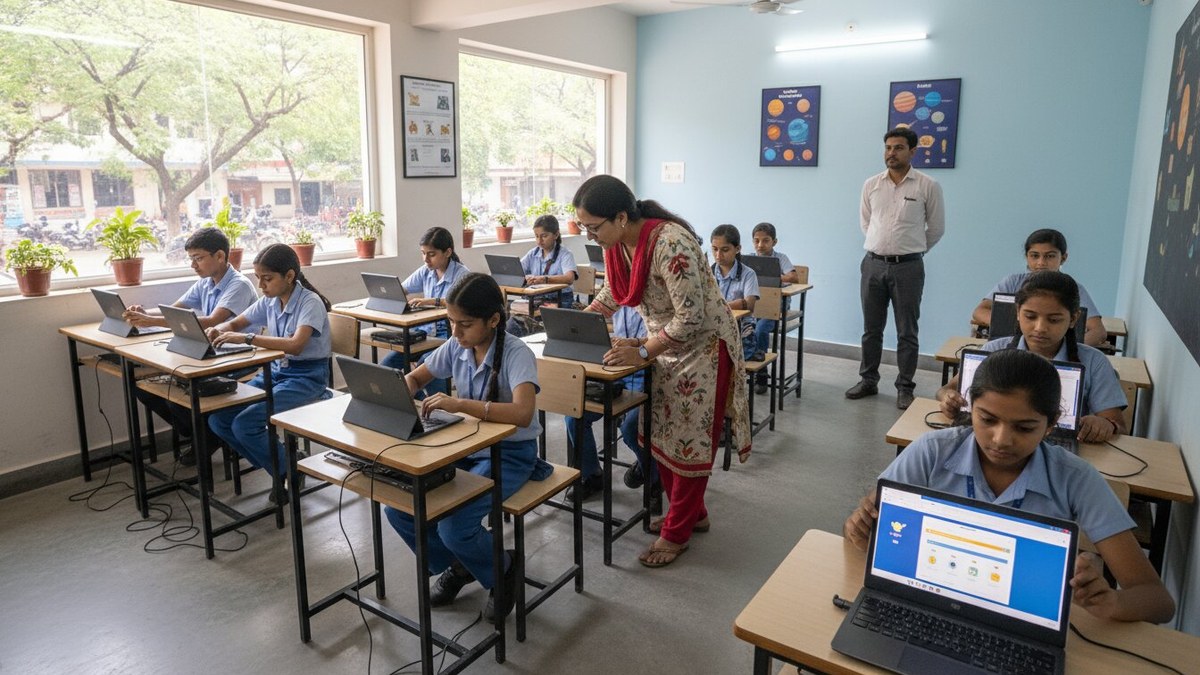
If you run a home-based learning centre or POD, adding AI teaching tools requires three things: reliable hardware, internet access, and a plan for how to use the tools alongside your teaching.
Hardware: Most AI tools run on standard computers or tablets. APNA PC is a complete, affordable bundle designed for educators in India: an Intel Core i3 mini PC with 8GB RAM, monitor, keyboard, mouse, webcam, and headset. It comes pre-loaded with tools like Scratch for coding, LibreOffice for document work, Blender for 3D design, and Apni Prerna for student safety and monitoring. The operating system is Zorin OS or Windows, both compatible with most AI platforms. Check the APNA PC product page for current pricing and bundle details.
Internet: Most AI tools require a stable internet connection. If your area has weak connectivity, download offline versions where available, or use tools that cache content locally.
Integration: Don’t replace your teaching with AI tools. Instead, use them to support your work. For example, assign an AI maths tool for practice homework, then use class time to discuss why students made mistakes and to teach concepts that the tool flagged as weak. This blend of human and AI support is most effective.
What benefits do AI teaching tools offer educators?
For teachers and learning centre operators, AI tools offer real advantages. They reduce marking time, AI checks multiple-choice and short-answer questions instantly. They provide data: you see which students are struggling and which are ahead, so you can group them for targeted support. They also reduce the pressure on you to be an expert in every topic; if a student asks a question you’re unsure about, an AI tool can explain it in a different way or suggest resources.
AI tools also make it easier to run a POD with students of mixed ages and levels. Instead of preparing separate lesson plans for each student, you set them tasks on an AI platform, and each student progresses at their own pace while you monitor and intervene where needed. This is especially valuable if you’re a homemaker, senior citizen, or tuition teacher starting a learning centre without formal teacher training. Teacher training courses in India can help you learn how to use these tools effectively.
What challenges come with AI teaching tools and how do you address them?
AI teaching tools are powerful, but they come with challenges. First, cost: good tools and hardware require upfront investment. Second, over-reliance: if students spend too much time on AI tools and not enough time thinking or discussing, they may not develop deeper understanding or creativity. Third, bias: some AI tools may have biases in their data, so they work better for some groups of students than others.
To address these, start small: try one or two free or low-cost AI tools before investing in expensive platforms. Use AI tools for practice and feedback, not as the sole method of teaching. Mix AI with group work, discussions, and hands-on activities. Monitor student progress yourself; don’t assume the AI tool’s assessment is complete. If you’re unsure how to use AI tools well, CBSE training and certification courses can guide you.
What is the future of AI in education?
AI teaching tools are evolving rapidly. In the near future, expect tools that understand not just what a student knows, but how they learn best, their learning style, emotional state, and motivation. Tools may also become more affordable and work better offline, making them accessible in rural India. Governments and NGOs are investing in AI for education, so more free or subsidised tools will likely emerge.
For educators, staying updated on AI tools is becoming as important as knowing your subject. The good news is that many tools are designed to be user-friendly, and you don’t need to be a tech expert to use them. Career counselling resources for students can also help you understand how to position AI skills in your teaching practice and guide learners on using these tools responsibly.
Frequently Asked Questions
Can AI teaching tools replace teachers?
No. AI tools are best used alongside teachers, not instead of them. Teachers provide motivation, emotional support, creativity, and the ability to adapt in real time to unexpected questions or situations. AI tools handle routine tasks like marking and personalised practice, freeing teachers to focus on deeper learning and mentoring.
Are AI teaching tools safe for children?
Most reputable AI tools for education have safety features and comply with data privacy laws. However, always check the tool’s privacy policy and ensure it doesn’t collect unnecessary personal data. Apni Prerna is built with student safety in mind. Supervise students’ use of any online tool, especially if they’re young.
Which AI tool should I choose for teaching maths?
There is no single “best” tool; it depends on your students’ age, level, and learning style. Scratch is excellent for teaching logic through coding. Khan Academy is strong for maths concepts and practice. Eklavya AI focuses on adaptive problem-solving. Try free trials of a few tools with your students and see which they engage with most.
How much does it cost to use AI teaching tools?
Many AI tools are free or have free versions, such as Scratch, Khan Academy, and Duolingo. Others charge monthly subscriptions at varying rates. For hardware, affordable options are available to support your learning centre. Start with free tools and see the return on investment before spending on paid platforms or equipment.
How do I learn to use AI teaching tools if I’m not tech-savvy?
Most AI tools are designed to be intuitive, with tutorials and support built in. Many also offer homework help and learning resources online. TeachToEarn and Apni Pathshala provide training for educators new to technology. Start with one simple tool, practise with it yourself, then introduce it to your students.
AI teaching tools are transforming how students learn and how educators teach. Whether you’re running a POD or teaching in a traditional classroom, these tools can help you reach more students, personalise learning, and reduce your workload. Explore APNA PC for affordable educational technology and start building a tech-enabled learning centre today.